Flipkart Studio
From concept to release, I built a content creation & management suite for content creators to power Ideas.
OVERVIEW
Flipkart Studio is a browser-based content creation & management suite built for media agencies and influencers. With its media editor and content publishing flow, it helps users create, manage, review, and publish content on Ideas on Flipkart mobile app and view analytics for the live content.
MY ROLE & DURATION
Product Designer II
Team: 1 Product Designer, 1 PM, Content Marketing Team
Jun 2018 - Dec 2019
The Problem
Flipkart launched Ideas in 2019 on its mobile app, with a goal to enhance its users’ shopping experience and drive regular engagement. The brands on the Flipkart platform could actively engage with users via short, snackable, and rich visual content that is easy to consume.
Content formats included - Images, Videos, GIFs, Story (Multi-image/video content), Polls & Personality quiz

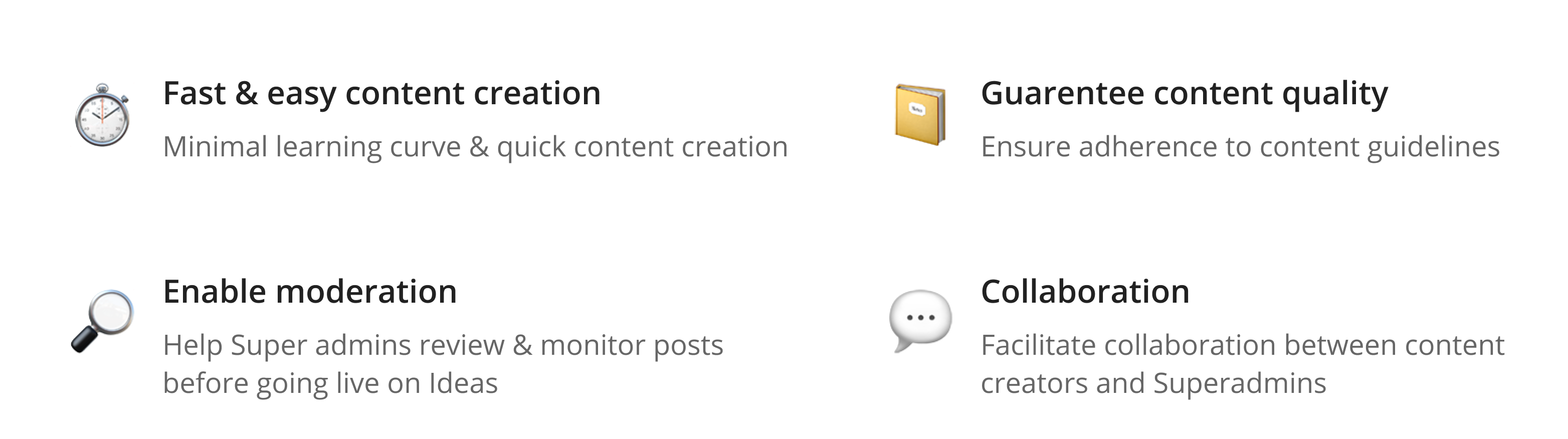
The team wanted good quality, meaningful and useful content on Ideas feed. This meant heavy moderation on every piece that goes live. Thus, came in Flipkart Studio, our very own content creation & management tool.
The core functionality of this was to be content creation and also moderation flows like content review, publishing workflows and analytics.
My Role
I joined the Flipkart Studio project in its early stage and worked on it from the concept & ideation phase until the development and the launch. As the only designer on the project, I collaborated closely with 1 Product Manager, the content marketing team, and the engineering team.
I regularly presented the ongoing work to my design manager, design team members, and the senior stakeholders throughout the project lifecycle for their feedback and alignment.

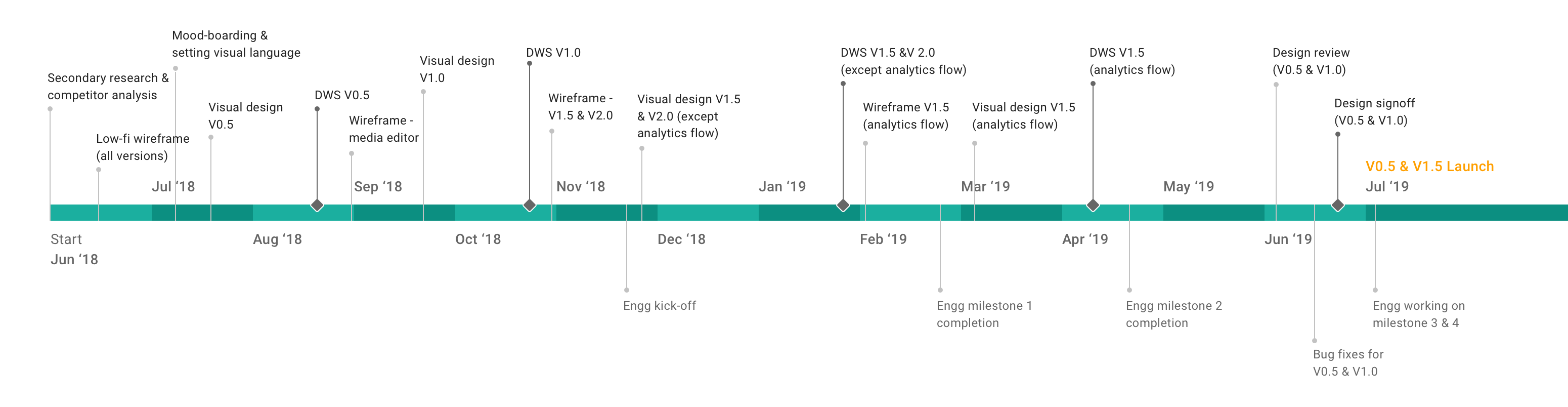
Project Timeline
I worked with the Product Manager to split the product features into four versions, enabling the team to work in sprints and phase out timely releases for each version. Each version followed a cycle of iterative wire-framing, creating visual mockups and prototypes.
Understanding Users
The methodology used to understand users: Qualitative user interview and Competitive analysis.
User Types
Based on the initial research and business requirements, I identified the following user types:
👉 Content Creators: Brands, Influencers, Internal category teams, Media agency
👉 Super admins: Content marketing team
User Needs
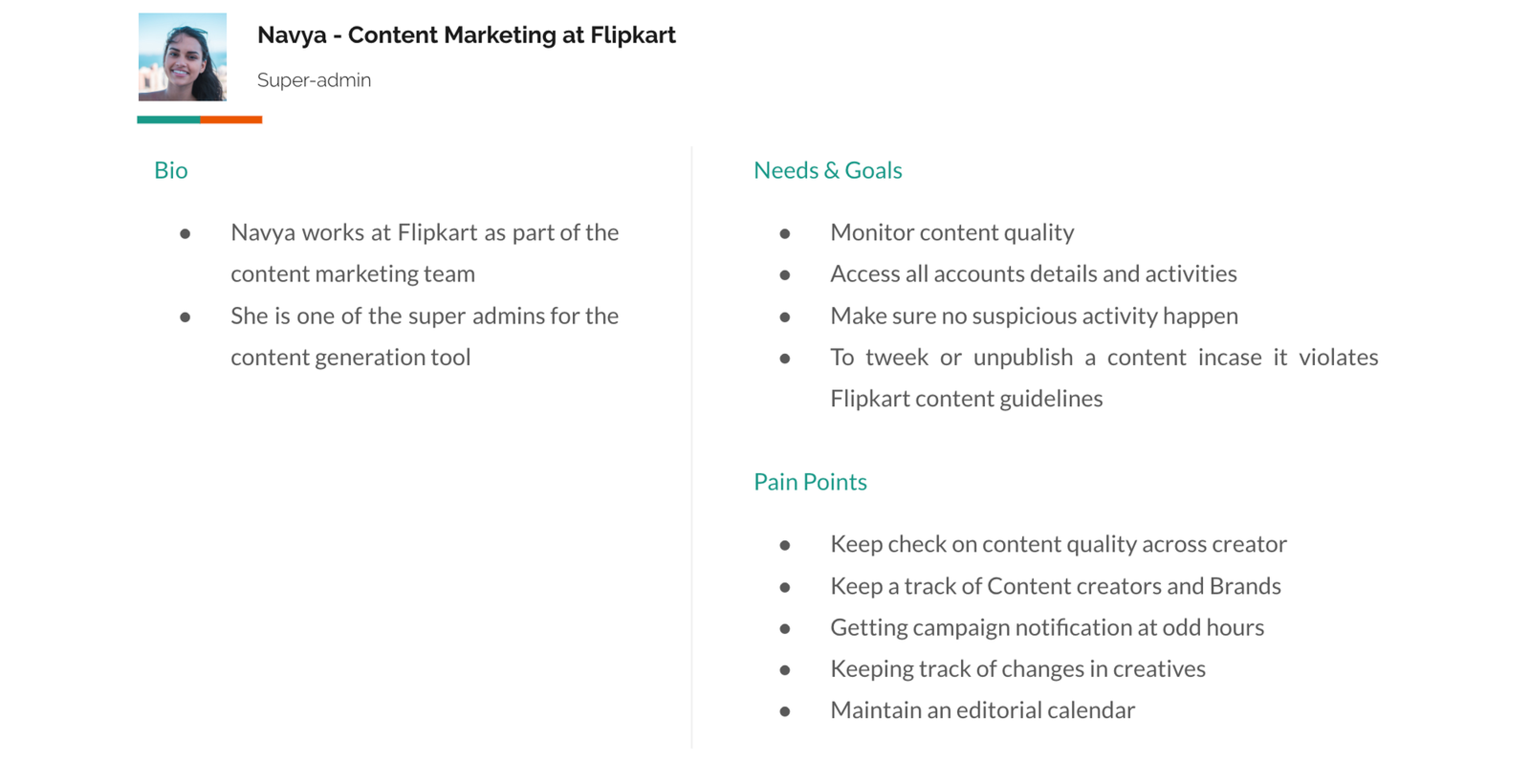
I talked to a few content creators from different backgrounds to understand their needs and pain-points when it comes to using editor tools. I also closely worked with the in-house content marketing team, who would use Flipkart Studio as content reviewers/admins.
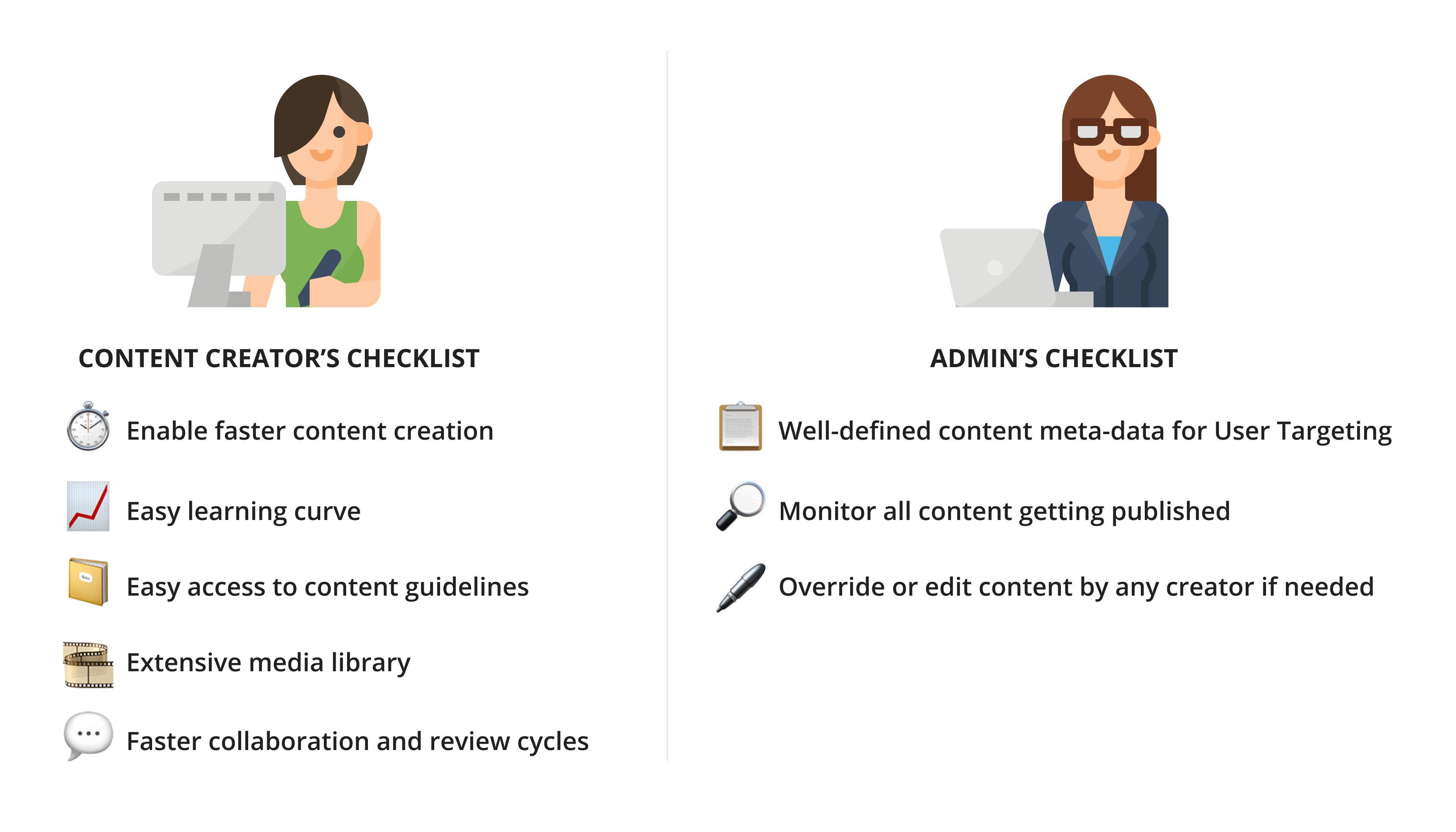
Personas
I came up with two primary personas to serve as a cumulative representation of all the typical user needs, goals, tasks, pain points that I derived from the Stakeholder interviews and user interviews.
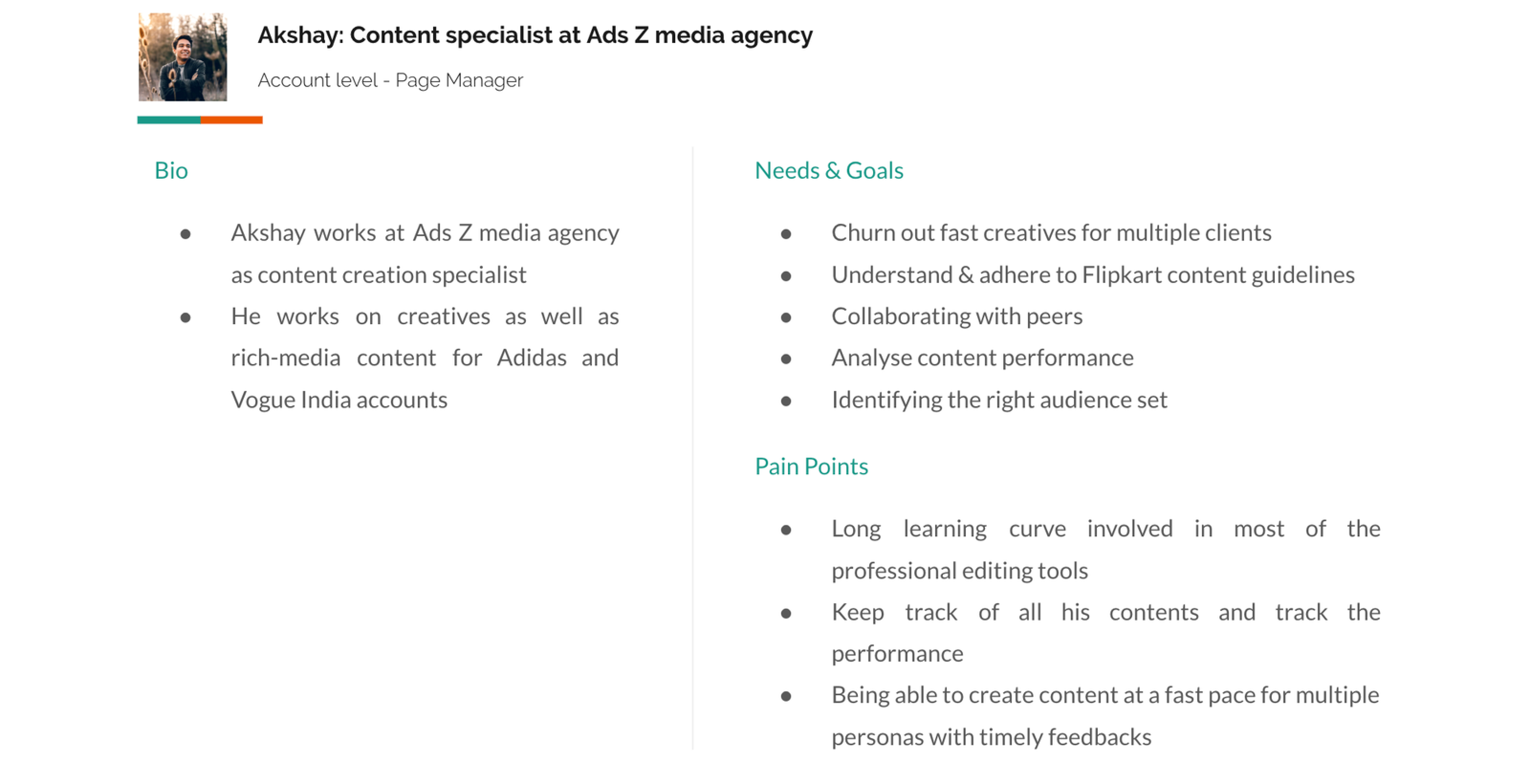
Product Goals
Design Goals
.png)
Ideation
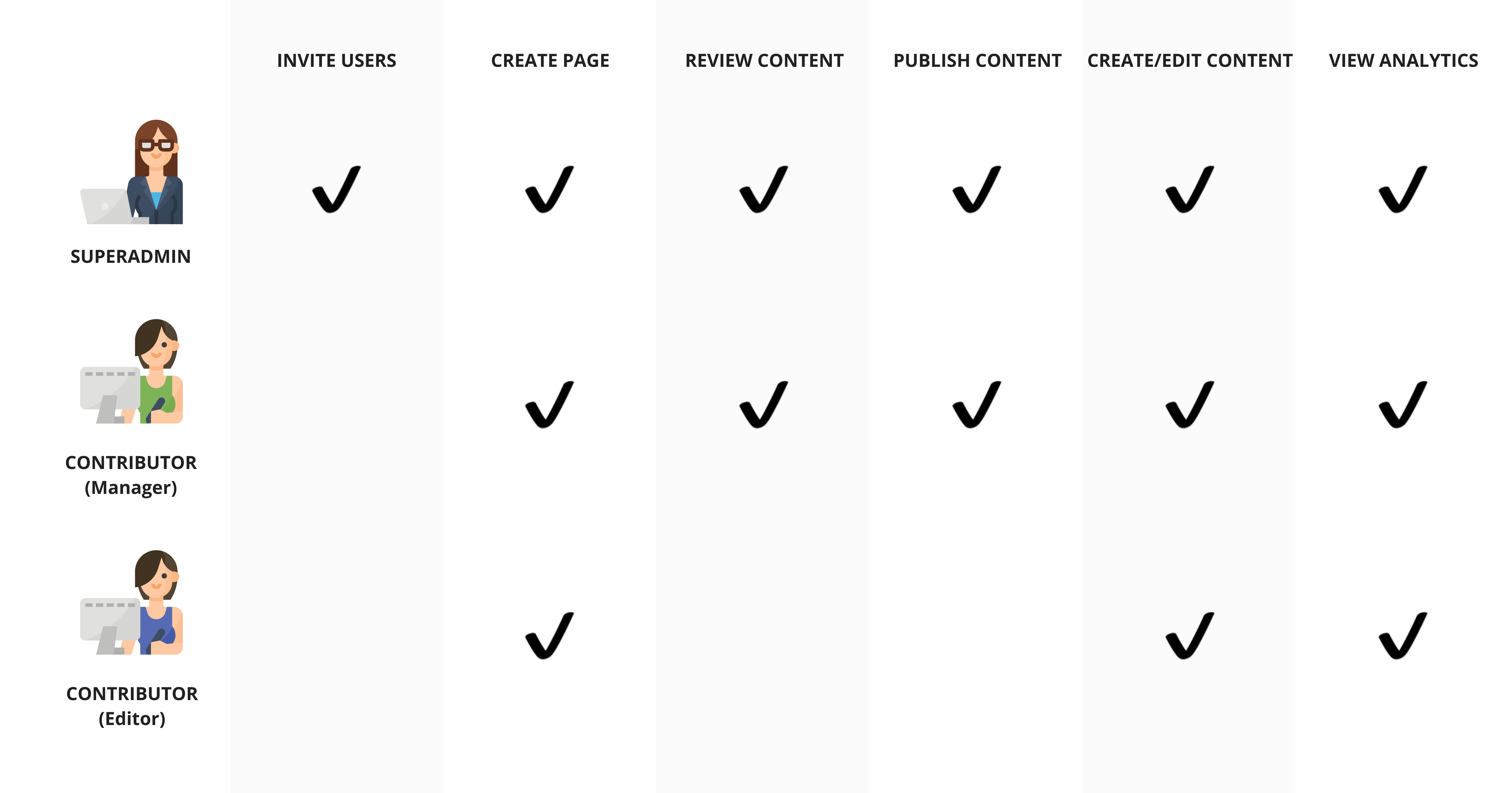
We simplified role-based access control (RBAC) to 2 levels - Account level & 'Page'-level based on user interviews and competitive analysis insights.
A ‘Page’ is a workspace for each brand/influencer.
A page admin could invite multiple content creators to create and publish content for their page.
Account-level roles
This is configured by Super-admins while inviting a new user to Flipkart Studio.
- Super-admin
- Contributor
Page-level roles
All contributors can create unlimited pages. Any contributor creating a page becomes that Page’s manager. S(he) could invite another content creator on Flipkart Studio to create content for their Page and assign Page-level roles.
- Manager
- Editor
Defining Platform Structure
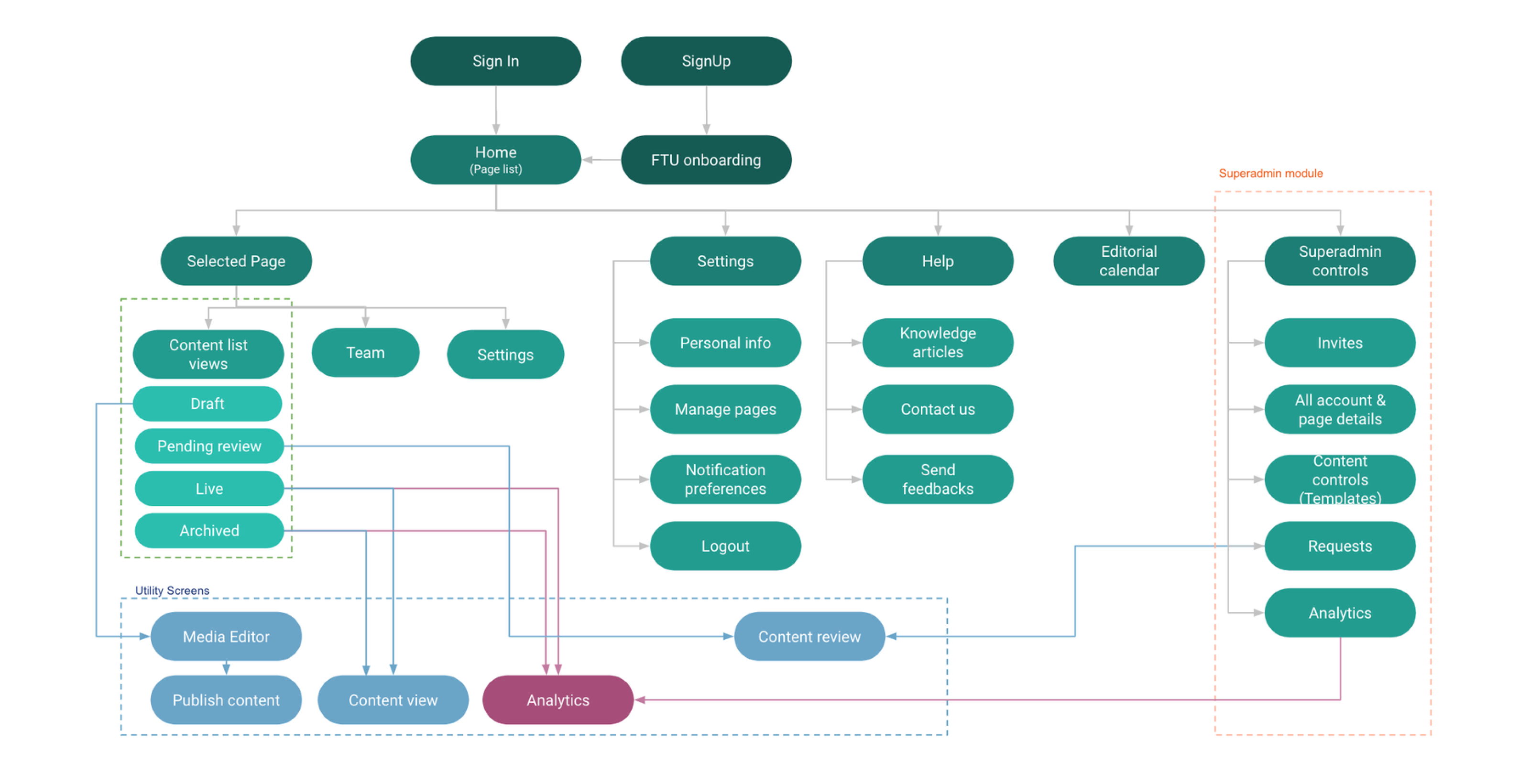
I started by working out a ‘shell’ and defining the information architecture. At this stage, I considered all use-cases for the entire product regardless of versions to ensure consistency and smooth user experience across the product.
A 'Shell' is an arrangement of crude blocks to reserve a place for navigation (primary, secondary and tertiary levels), actions (global and local level), and content within the interface. This arrangement remains consistent across screens to maintain the structure and hierarchy.

Wire-framing
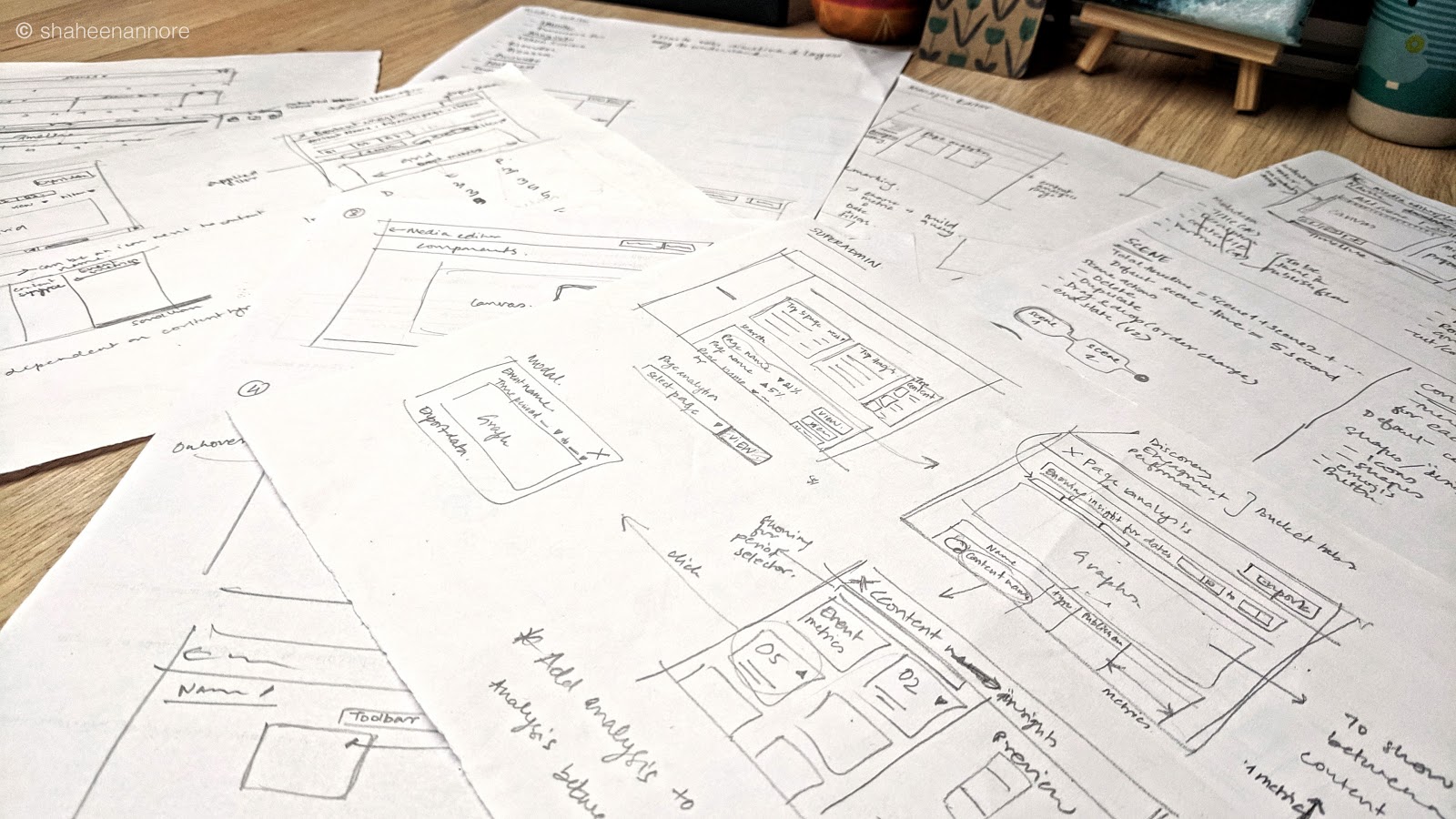
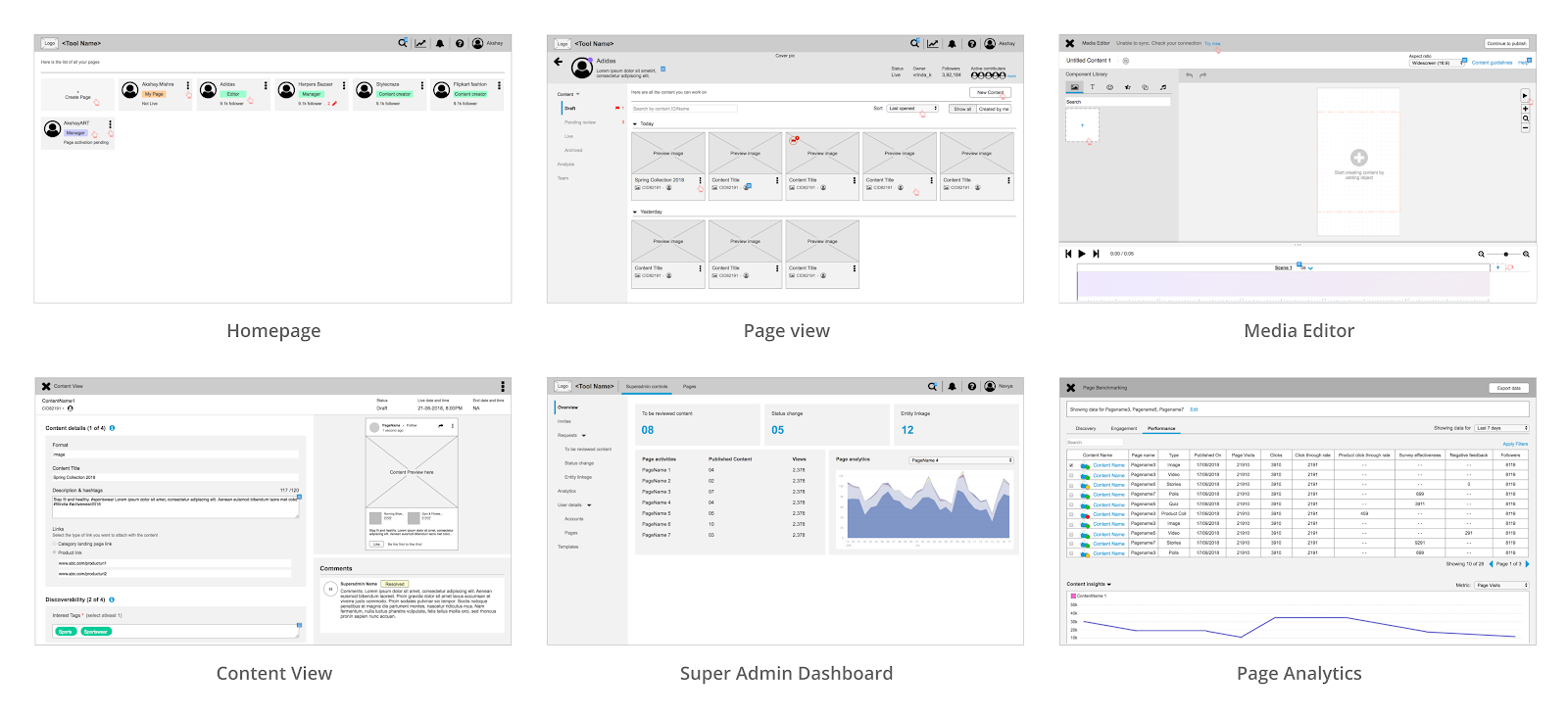
My process involved quick sketching concepts and then converting these sketches into interactive wireframes on AxureRP. This helped me to concentrate on perfecting the feature requirements, and basic usability & interaction needs sans the added diversion of the visual design elements.
Style-scaping
While working on the wireframes for V0.5, I also created a mood-board to develop a visual design language for the tool. Few keywords which would best describe the style:
- Simple
- Clean
- Modern
- Pleasant
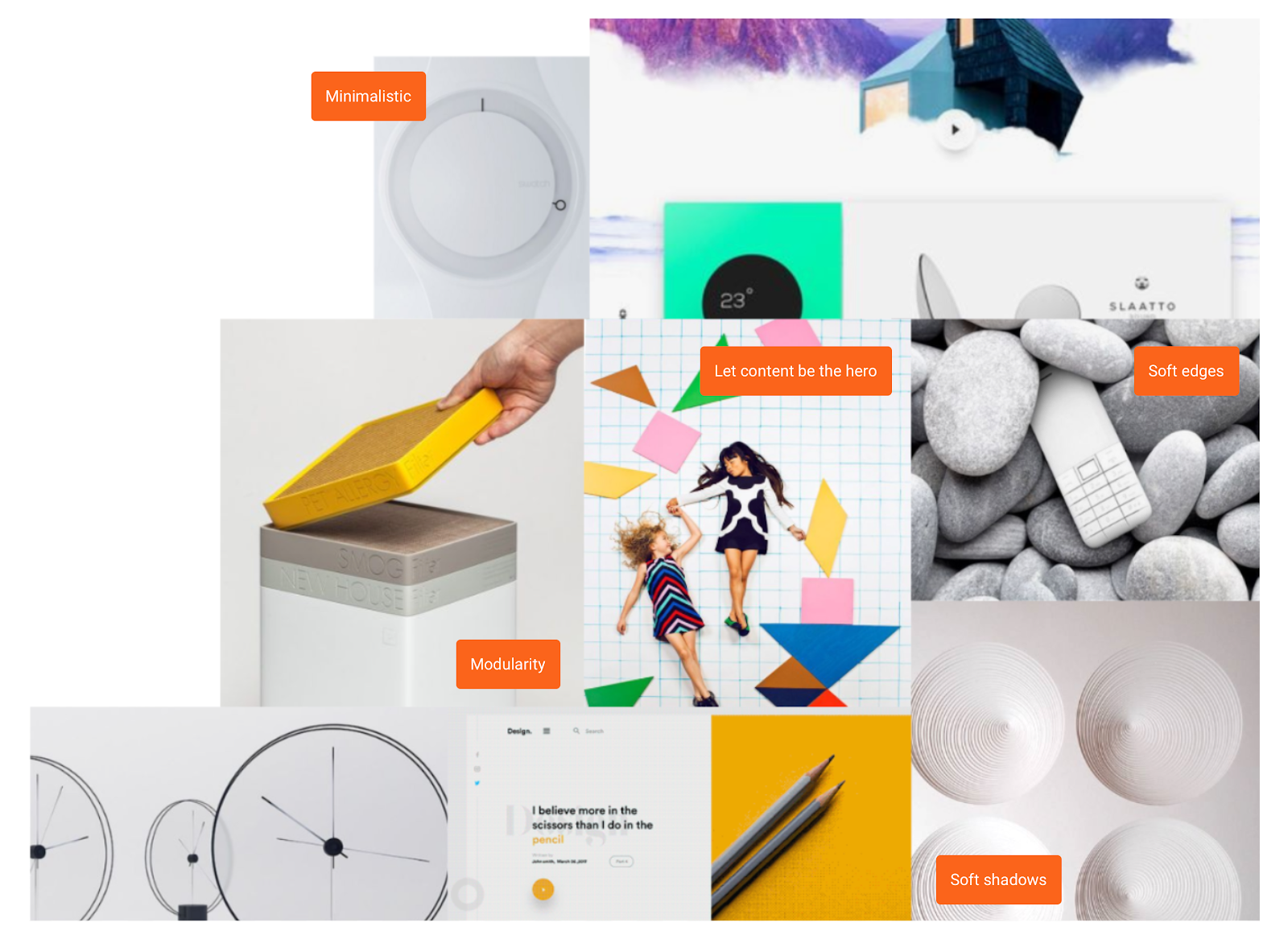
Flipkart Studio is a functional tool with a primary focus on content creation. Hence, I decided to use a neutral palette and let content pieces be the hero.
Visual Design Language
The design language foundation for this platform was Google Material Design. This helped provide a flexible foundation for innovation and brand expression. I wanted the new style to still belong to the Flipkart family and not look alien, yet have a fresh and minimalistic touch.
I worked on additional modular components to cater to web platform-specific requirements such as page titles, content tiles, text fields, and various editor components - the header, action toolbar, timeline component, etc.
Following a system thinking approach helped me in simplifying complex flows and maintaining design sanity throughout.
Defining User Flows
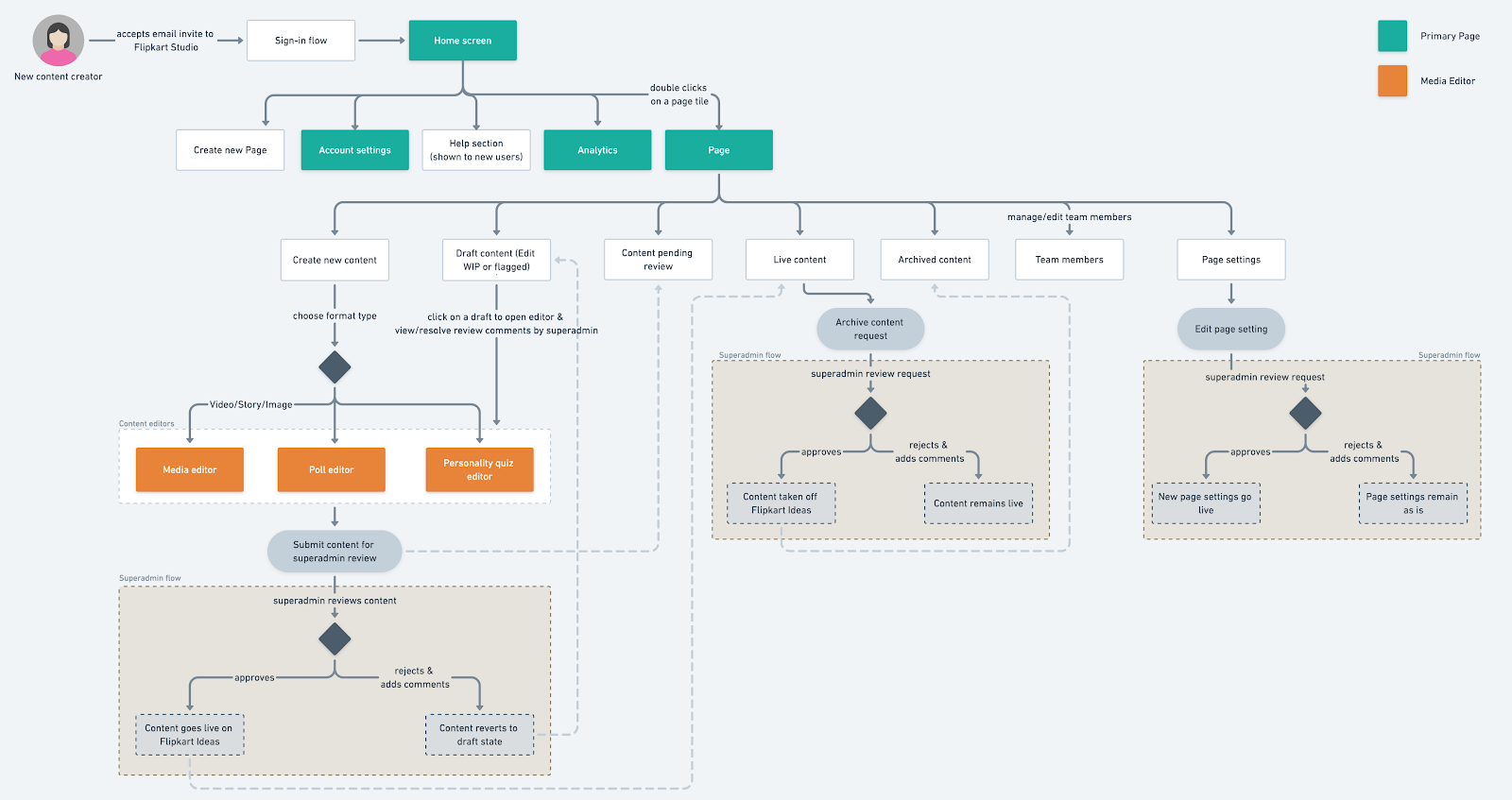
1. For a new content creator
- Super admin whitelists a creator by inviting him/her to create content for Ideas using the Flipkart Studio.
- The creator gets an email invite.
- The whitelisted creator accepts the invite by clicking the link inside the email. S/he is taken to the Flipkart Studio sign-up form.
- New creator completes the sign-up process.
- Now s/he can work on the default ‘Page’ or create a new ‘Page.’
- When a user creates a page, it is sent to the super admin for approval before it goes live on Flipkart Ideas. Meanwhile, the user can continue exploring the tool or create content.
- For content which are rejected in the review process, the creator can open the content, check for super admin’s comments, edit the content, and resubmit it for review for publishing.
2. For a Super admin
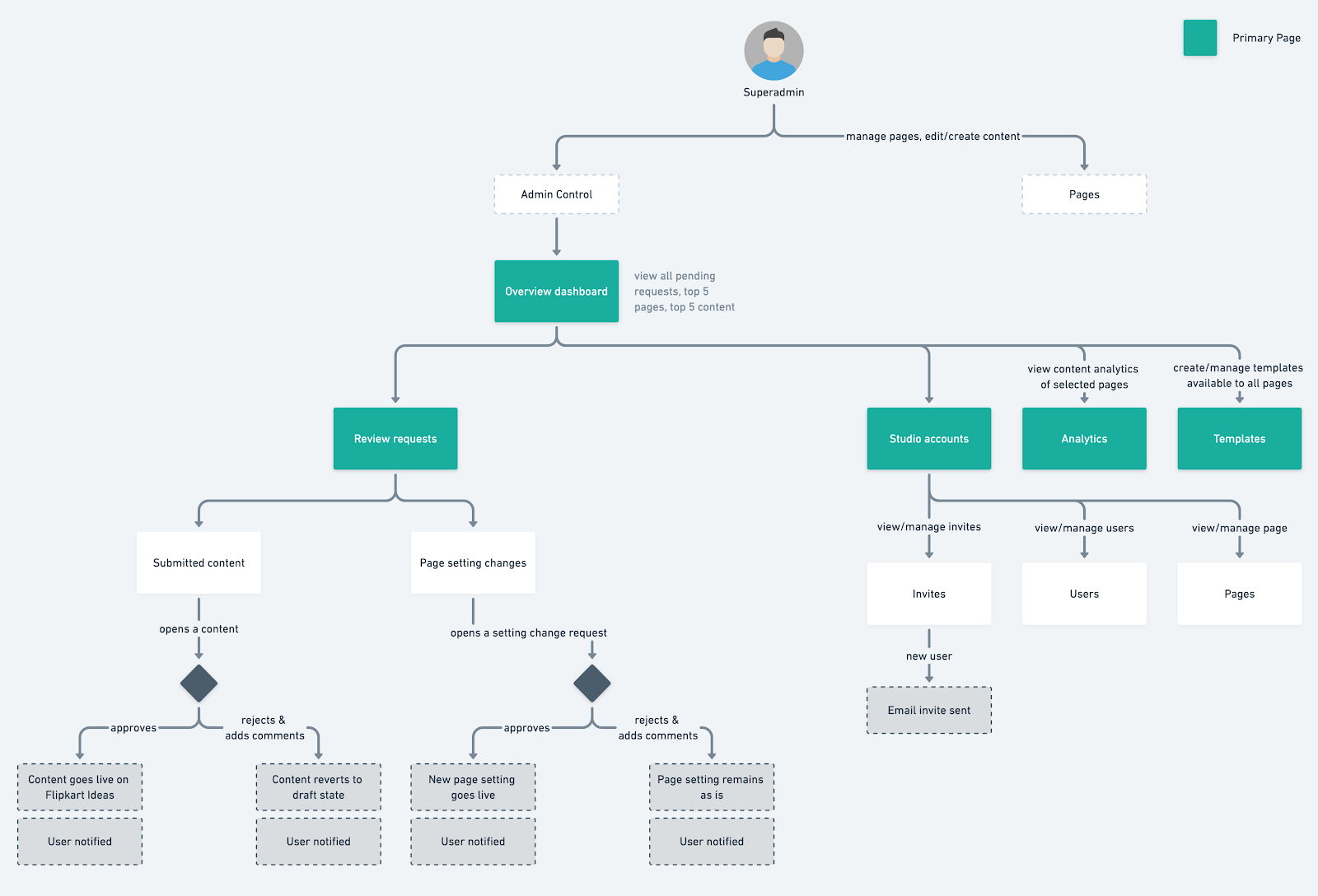
Super admin will have the right to monitor and control activity across accounts and pages as a guardrail around (a) content quality and (b) suspicious activity. Super admin can do the following:
- Invite a new users to the Flipkart Studio
- Manage settings for all the accounts and pages
- Review & edit content
- Review page setting requests
- Access analytics for all the pages.
Key Flows
Flipkart Studio usage revolves around content creation, creator ↔ super admin collaboration, and the review workflows. Below are clips from the live product, showcasing each of these key-flows.
1. Using media editor
The creator uses the editor to create content and next defines the content attributes within the publish flow.
2. Superadmin - Review a content.
- The submitted content appears within the ‘pending review’ list in the super admin control. The super admin reviews the content.
- If the content follows all Flipkart guidelines, it is approved and goes live on the requested publish date & time.
- If the content does not follow Flipkart guidelines, the super admin marks comments and rejects the content. This rejected content then appears on the creator’s page as a ‘flagged’ content.
3. Editing a flagged content
The creator can view and work on the suggestions made by the super admin in his/her comments. Once all the comments are worked upon, the creator can resubmit the content for review. This again triggers the review workflow for the super admin.
Unique Challenges
1. Designing scalable modular components within editors
Bringing in modularity was one of the core design goals. This started with defining the shell that covered the -
- Navigation structure (i.e., primary, secondary, and tertiary navigation logic)
- CTA placement (global CTAs, local and contextual CTAs)
- Area for the content
Next came the component design and it's usage logic. This covered -
- Notifications (info, error, warning types)
- Input field states
- Modal design
- Card design (page tiles and content tiles)
The challenging part was designing all the editors with modular components that can be reused into one another. Overall, the content creation process could be divided into two simpler steps -
- Editing content within the editor (media editor/poll editor/personality quiz editor)
- Adding content attributes within the publish flow
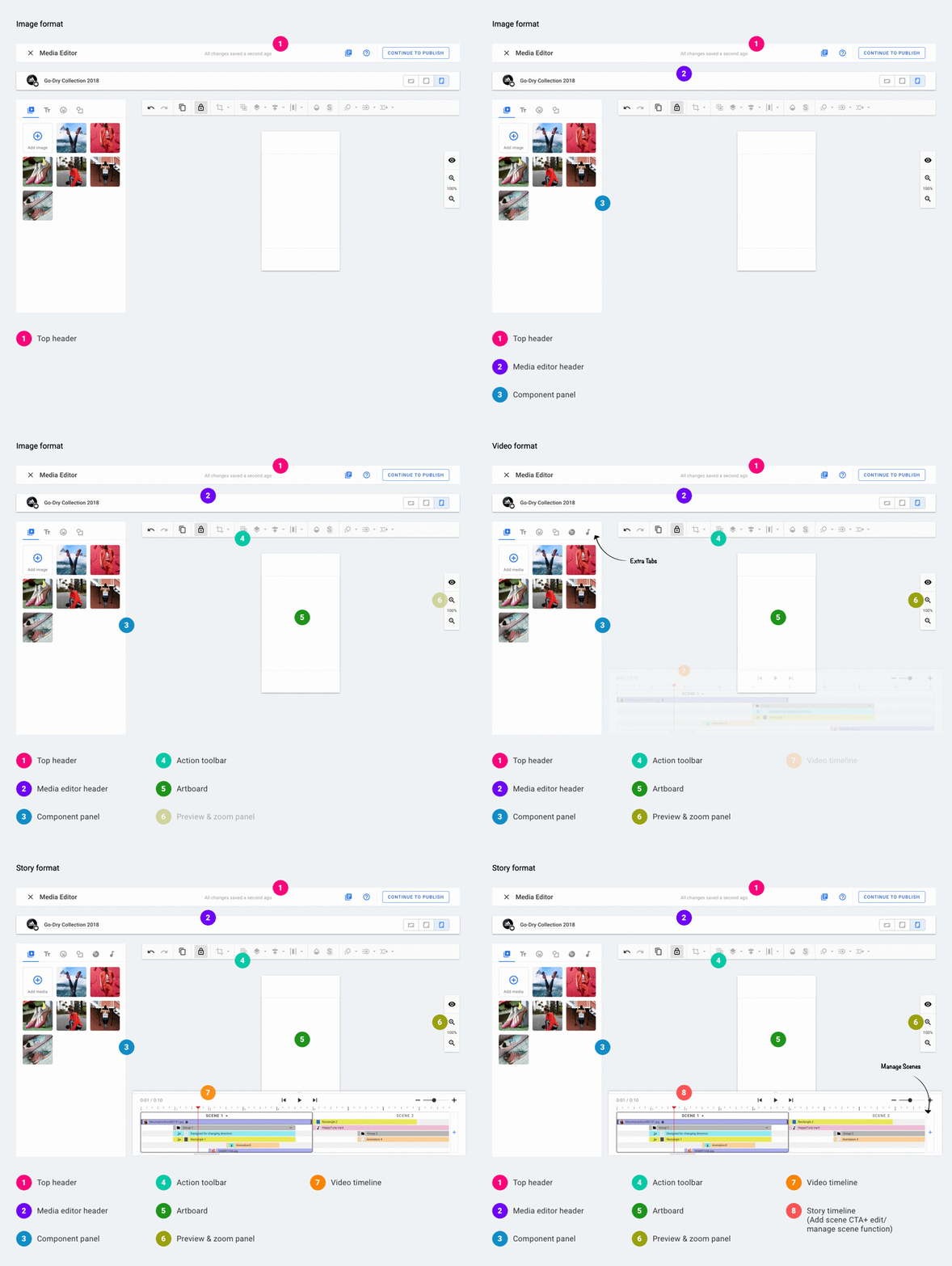
The media editor's interface changes contextually as per the selected format. For example, the video and story format editor both have a timeline, while the story editor’s timeline has the functionality of adding scenes, and editing the scene’s properties.
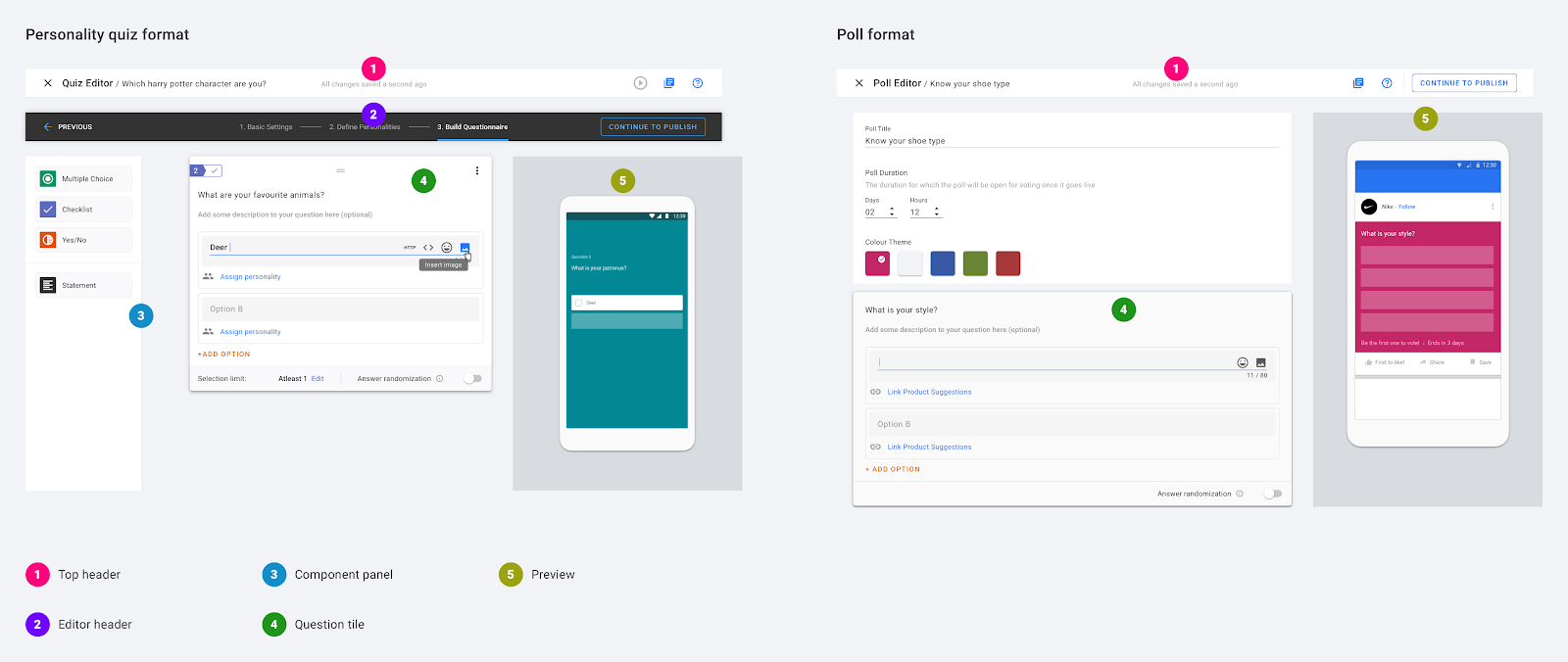
Both Personality quiz editor and Poll editor use similar interactions and the same question tile. This helps in ease of on-boarding users and facilitating familiarity.
2. Collaborating with different stakeholders
A product designer wears many hats. They work very closely with:
- The product managers to understand requirements and business intent.
- Developers and QA team to ensure everything is implemented according to the UX specifications
- Stakeholders to defend the user experience and to move the needle in the right direction (what the user needs v.s. what the stakeholder wants)
I shared a UX timeline sheet across stakeholders to keep everyone in the loop regarding the UX status and execution plans. In addition to this, I also shared UX link master-sheet. This sheet contained all UX related links that any stakeholder would need. This mainly was very helpful in managing documents and prototype links in one place.
3. Art direction for the Media library
.png)
For the launch, we worked with freelance illustrators to get stickers packs for the media library.
I collaborated with an illustrator from our design team to work on the design briefs. I also worked with the content marketing team to understand the topical content being planned so that the sticker packs being created are relevant and useful to the content creators.
4. Validating key user-flows
To get some early feedback, I decided to conduct guerrilla testing to validate designs for the media editor and the publishing flow.
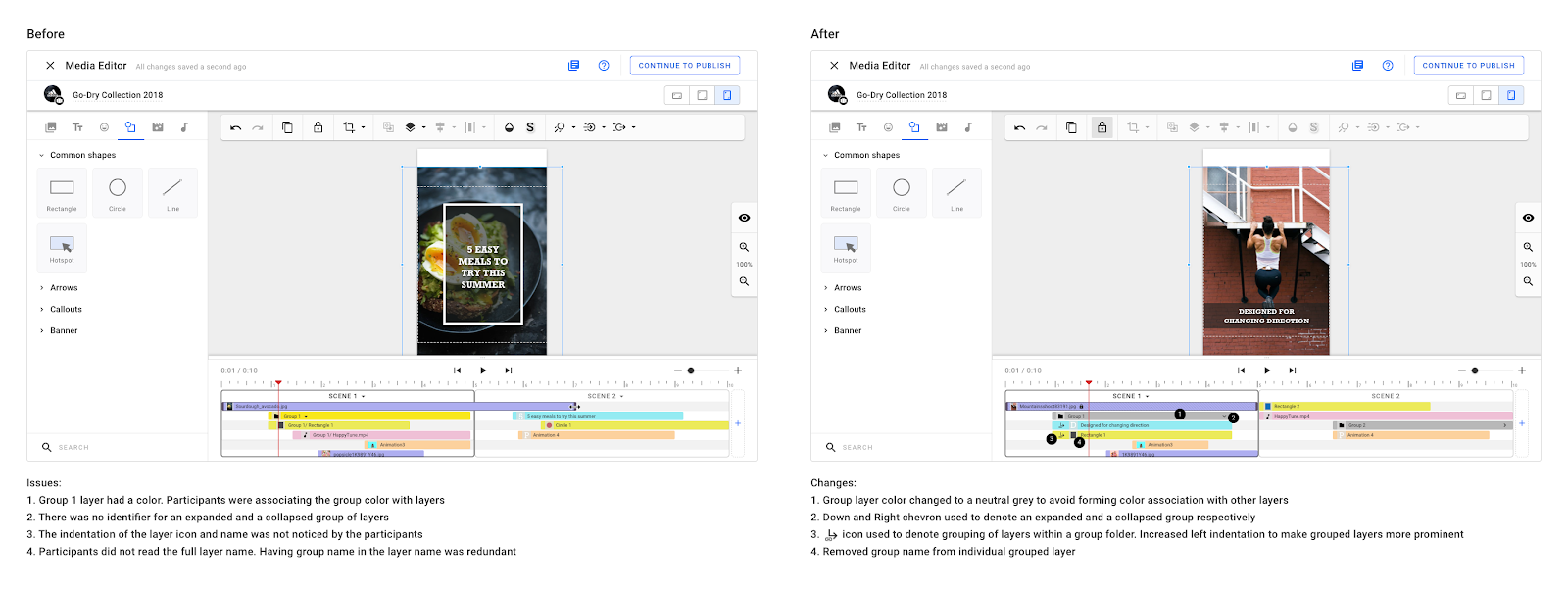
Main blocker faced by most participants was working with the grouped layers. The image below shows how I simplified the grouped layers within the timeline.
Impact & Outcome
Flipkart Studio V1.0 was launched in July 2019. The creators could create image, video, and story type of content.
Within the first 3 months of launch, 350+ content creators published 8200+ pieces of content on Ideas, all created via Flipkart Studio
Ideas has an average of 400K+ daily active users as of Oct 2019.
Flipkart Studio was highly appreciated within the org for its easy-to-use and scalable design. Later it was decided to expose poll editor as an API to be used within the survey platform (an internal Flipkart platform used to serve NPS and other user surveys on the app).
Product Reset
The business modal went through significant changes soon after Ideas launch. The creators who are on-boarded on the platform are a mix of Influencers (Category A, B, C), Brands, Publishers, and Media agencies. Most creators are posting rehashed content pieces from their Instagram, Youtube, or any other social handles on Flipkart Ideas.
As part of next step, my user-research counterpart and I reached out to Influencers working with us to understand -
- Incentive or motivation factor in creating good content
- Their work environment
- Their pain-points
- Their content creation & publishing process
Study insights indicated that most of the influencers like to edit on the go and have an established creating & editing workflow. Some common editing apps used were - Adobe Lightroom, Canva, Inshot etc.
The team decided to focus on introducing a mobile app version of Flipkart Studio. The scope for MVP version of the Flipkart Studio app was to cover - content upload, content publish and analytics flows.
Learnings & Retrospect
- Designing a product from grounds up
I got to experience the entire project life-cycle as I was involved in the project right from the beginning. There were a few of hiccups on the way but it was a great learning experience. - Early feedback from Users
Getting Users involved much earlier in the design phase would have helped in identify the pain areas, define the MVP, and simplify the workflow even further.
- Experiencing Product pivoting
After months of hard work, when Ideas was launched, the team quickly learned from the data & trends and came up with alternates to help the product scale and find the right product-market fit.
Change in business strategy meant a shift in content strategy as well. This resulted in an entirely different segment of content creators getting on-boarded for whom Flipkart Studio wasn’t designed for.
As part of the Flipkart Studio team, we carried out user research sessions with the new segment of the content creators in the Flipkart eco-system to figure out what’s working and what’s not. The next step was to determine the shift that needs to take place for the pivot and build towards that.